
EviCore Prior Authorization: A Practice Manager’s Guide to Submissions, Timelines, and Appeals
An outpatient authorization request can stall at several points: before clinical records are complete, while a review is underway, or after a determination requires follow-up. Each situation calls for a different action.
For practice managers and authorization teams, an effective EviCore prior authorization workflow starts with identifying the applicable health plan requirements, submitting relevant documentation, and assigning responsibility for the next step.
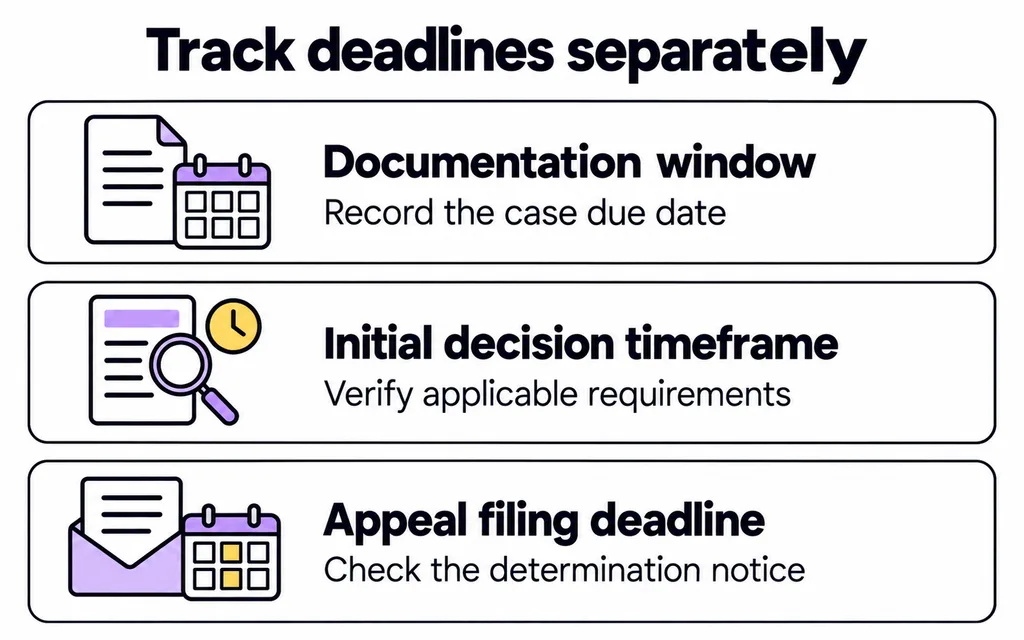
Key takeaway: Track documentation deadlines, medical review timelines, and appeal deadlines separately. A case number alone does not tell your team whether a request is ready for review, approved, or awaiting action.
This guide focuses on outpatient medical services, particularly imaging and specialty practice workflows. It incorporates EviCore’s September 2026 submission update.
In This Guide
Confirm the health plan and authorization requirements first
EviCore by Evernorth provides utilization management and prior authorization services for health plans. Before starting a request, confirm that the patient’s specific plan delegates the requested service to EviCore. Verify eligibility and benefits with the health plan rather than relying solely on an existing portal record. EviCore general FAQ
Make the following checks part of your intake process:
- Patient identity, member ID, and exact health plan product.
- Requested service and procedure code.
- Ordering clinician and performing facility.
- Planned date and location of service.
- Applicable authorization requirement and submission route.
Record where and when the requirement was verified. This gives another team member a usable reference if the case changes hands.
For imaging practices, confirm that the order, scheduled examination, and authorization request describe the same study. Resolve discrepancies involving the body region, contrast, or performing location before they move further through the workflow.
Prepare documentation that addresses the requested service
A complete chart is not necessarily a useful authorization submission. Staff should identify the records relevant to the requested examination or procedure and confirm that they address the applicable clinical criteria.
EviCore’s required-information checklist identifies service-specific documentation. For radiology, this can include symptoms, examination findings, treatment history, relevant imaging or laboratory results, and pertinent medical history. Cancer imaging requests require additional context, such as whether the examination is for staging, restaging, or surveillance. Required medical information checklist
Check administrative details
Before submission, reconcile the patient identifiers, ordering and rendering provider details, requested codes, and contact information.
Designate a contact who can respond to documentation questions. A correct submission can still become difficult to manage if correspondence reaches an unattended fax queue or an employee who is unavailable.
Check clinical relevance
Use the applicable guideline and worksheet to identify what the reviewer needs. Avoid imposing a universal “last 30–60 days” rule on every request.
For example, an imaging coordinator may need to obtain an outside imaging report referenced in the ordering clinician’s note. Recording the report as “requested” is different from confirming that it has been received and attached.
Clinical questions should return to the ordering team for clarification. Administrative staff should not infer findings or select answers simply to move through the submission.
Understand EviCore’s four-calendar-day documentation window
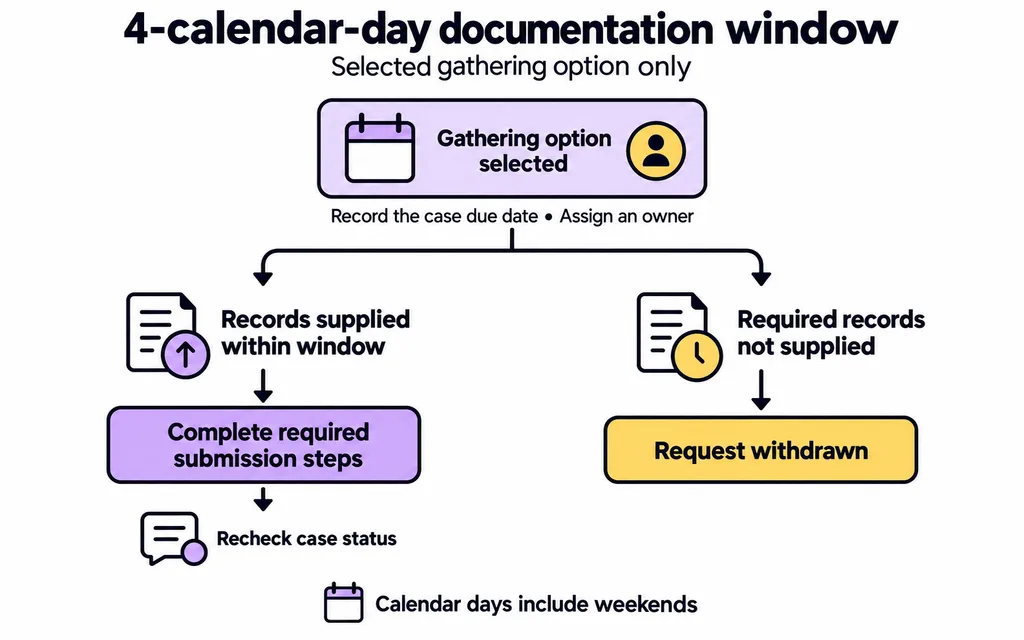
Effective September 1, 2026, EviCore updated its electronic case-build workflow. When supporting records are not ready, providers may withdraw the request or select an option allowing four calendar days to gather and upload clinical information. If the required information is not provided within that selected window, the request is withdrawn. Urgent workflows continue to require clinical information upfront. EviCore standardization FAQ
This option should not be treated as the deadline for every request awaiting information. It is a specific documentation-gathering pathway.
Manage the window as an assigned task
When staff select this option:
- Record the due date displayed for the case.
- Identify the exact missing record.
- Assign an owner and backup.
- Request the record from the appropriate clinical team.
- Confirm that the upload and required submission steps are complete.
- Recheck the case status and save the confirmation.
Calendar days include weekends. Plan coverage accordingly rather than assuming the next working day will fall within the window.
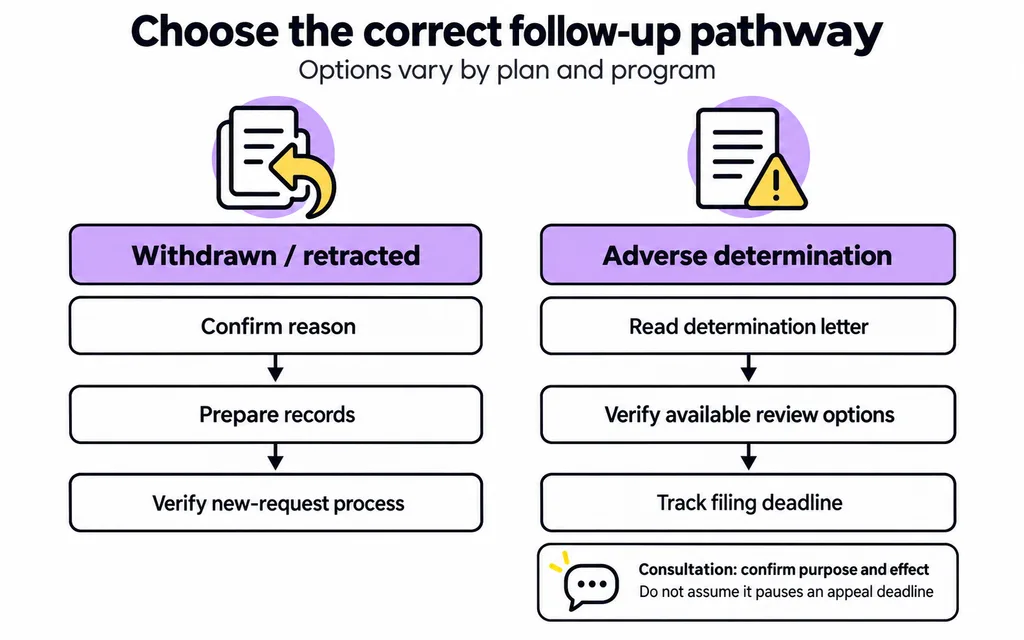
EviCore’s training material distinguishes a retracted request from a determination and indicates that a new request may be submitted when records become available. A withdrawn request therefore needs a different follow-up process from a medical-necessity denial. September 2026 provider training
Check EviCore prior authorization status and identify the next action
Start with the official EviCore Providers’ Hub, which provides login, status-check, clinical guideline, and support links.
Within the applicable portal, use the case worklist, Certification Summary, or Authorization Lookup functions. EviCore’s training describes access to status information, correspondence, clinical uploads, and post-decision functions. Follow the interface available for your program. Portal training reference
A useful status check answers more than “Has it been approved?”
Record what changed, whether action is required, who owns that action, and when it is due.
The following is a recommended internal work-queue framework, not a list of official portal status labels.
| Situation | Recommended team action |
|---|---|
| Documentation still being gathered | Obtain the missing record and monitor the applicable deadline. |
| Request submitted for review | Retain submission confirmation and monitor correspondence. |
| Additional information requested | Identify the specific question, response deadline, and responsible clinician or coordinator. |
| Request withdrawn or retracted | Confirm the reason and determine the appropriate new-request process. |
| Adverse determination issued | Read the determination letter and identify available post-decision options. |
| Approval received | Reconcile the authorization details with the scheduled service. |
Avoid recording only “pending.” That description does not tell the next employee whether to wait, upload a document, contact the payer, or escalate a clinical question.
How long does EviCore prior authorization take?
EviCore prior authorization turnaround times vary by health plan, program, and request type. Confirm the relevant program’s requirements and distinguish its processing expectations from legally applicable decision deadlines.
For medical items and services subject to CMS-0057-F, the 2026 requirements generally establish these maximum initial decision periods:
| Covered payer category | Standard request | Expedited request |
|---|---|---|
| Medicare Advantage | Seven calendar days | 72 hours |
| Medicaid fee-for-service and managed care | Seven calendar days or less, as applicable | 72 hours or less, as applicable |
| CHIP fee-for-service and managed care | Seven calendar days or less, as applicable | 72 hours or less, as applicable |
Decisions must be made as quickly as the patient’s condition requires. Program-specific conditions may permit extensions. These provisions exclude drugs, do not establish a universal commercial-plan deadline, and exclude federally facilitated exchange QHP issuers from this timeframe policy. CMS measures the deadlines from receipt of the request. CMS prior authorization timeframe guidance
Do not add the four-day documentation window to a review period to calculate an assumed decision date. Record the case’s actual submission history and clarify uncertain timing with the appropriate plan or EviCore contact.
Similarly, an approaching appointment is a reason to escalate internally, but clinical urgency must be established by the treating team under the applicable requirements.
Respond to denials using the correct pathway
Read the determination letter before selecting a response. Identify the reason, available review options, filing instructions, and deadlines.
A helpful internal denial summary captures:
- The requested service and case number.
- The stated reason for the adverse determination.
- The clinical information already submitted.
- Any missing or disputed information.
- The available next action and its deadline.
Commercial plans: verify reconsideration and peer-to-peer options
Do not assume that every commercial denial has a 14-day reconsideration window or can be overturned through a peer-to-peer discussion.
For example, EviCore’s 2026 SummaCare cardiac imaging and vascular intervention training states that commercial members do not have a reconsideration option, including a peer-to-peer capable of changing the decision. It describes an explanatory clinical consultation and a separate first-level appeal process with a 180-calendar-day filing window. Those instructions belong to that program, not every EviCore-managed plan. SummaCare program guidance
Before scheduling a discussion, confirm its purpose: can it change the determination, or is it consultative only? Track the appeal deadline independently.
Medicare Advantage: distinguish a consultation from an appeal
EviCore’s general FAQ states that a post-denial Medicare consultation is educational and does not change the case status. Staff should follow the formal appeal instructions rather than treating that discussion as an appeal submission. EviCore post-decision guidance
CMS calls the first-level Part C appeal a reconsideration by the Medicare Advantage health plan. It generally must be filed within 65 calendar days of the date of the organization determination notice. CMS lists decision limits of 30 calendar days for standard pre-service reconsiderations and 72 hours for expedited pre-service reconsiderations, with decisions required as quickly as the enrollee’s health requires. CMS Medicare Advantage reconsiderations
These are appeal timelines. They should not be confused with initial authorization decision periods. A grievance is also a separate process; it should not be used as a substitute for an appeal challenging a coverage determination.
Build the response around the stated reason
When a review option is available, organize the response around the determination’s specific concern. Identify the relevant clinical note, test result, treatment history, or explanation and make it easy to locate.
Retain proof of submission and the reference number. Do not assume that requesting a consultation pauses another filing deadline.
Reconcile the approval with the scheduled service
Before closing the authorization task, use a final reconciliation check:
- Correct patient and member information.
- Authorized service and procedure codes.
- Performing provider or facility.
- Approved dates.
- Units or visits, where applicable.
- Authorization number and determination letter.
Share the verified details with scheduling and billing so they work from the same information.
If the procedure or facility changes, confirm whether the authorization needs updating. EviCore directs providers to report authorization changes, including changes to codes or facilities. EviCore authorization revision guidance
Keep authorization tracking connected to the broader revenue cycle. Eligibility verification, claim preparation, and subsequent payment follow-up still require their own checks.
Use a work queue that makes responsibility visible
For EviCore prior authorization tracking, MediBilliX recommends recording the following fields in the practice’s approved workflow system:
| Field | Operational purpose |
|---|---|
| Case number, plan, and program | Identifies the request and applicable instructions. |
| Scheduled service date | Shows which appointments need attention. |
| Current status and last checked time | Makes the information’s age visible. |
| Missing information or next action | Specifies what needs to happen. |
| Deadline and source | Shows the date and where it came from. |
| Owner and backup | Supports coverage during absences. |
| Submission or upload confirmation | Documents completed actions. |
| Determination and scheduling handoff | Connects the authorization outcome to the service. |
Review cases by clinical urgency, approaching deadlines, and scheduled service dates—not simply by the order in which requests entered the queue.
Useful internal measures include requests withdrawn before review, outstanding documentation tasks, time between record receipt and submission, and approvals requiring correction before service. Define each measure consistently before comparing results.
Frequently asked questions
What happens if I miss EviCore’s four-day documentation window?
If you selected the four-calendar-day gathering option and do not provide the required clinical information in time, EviCore states that the request will be withdrawn. Check the case record before taking the next step. EviCore workflow FAQ
How do I check EviCore authorization status online?
Use the official Providers’ Hub to access the appropriate portal or status-check function. Review the case details and correspondence, then record any required action in your work queue. EviCore Providers’ Hub
Can I request authorization after the service?
Retrospective review availability and submission periods vary by plan and program. Verify the applicable instructions before relying on this option. EviCore directs providers to health-plan-specific resources for retrospective requests. EviCore general FAQ
What should our team do when an appointment is approaching and the case remains unresolved?
Identify the unresolved step, contact the responsible party, and notify scheduling and the ordering team. If the patient’s condition has changed, the clinician should assess whether an expedited pathway is appropriate. Document the communication and next action.
How MediBilliX can support your authorization workflow
MediBilliX provides prior authorization services for U.S. healthcare providers. Practices can discuss support for organizing submissions and follow-up within their existing operations.
A useful starting point is to identify where work repeatedly stalls: gathering records, assigning follow-up, monitoring deadlines, or communicating determinations to scheduling.
Contact MediBilliX to discuss your prior authorization workflow and the administrative support your team needs.